UK sequencing traffic light control circuit model railway
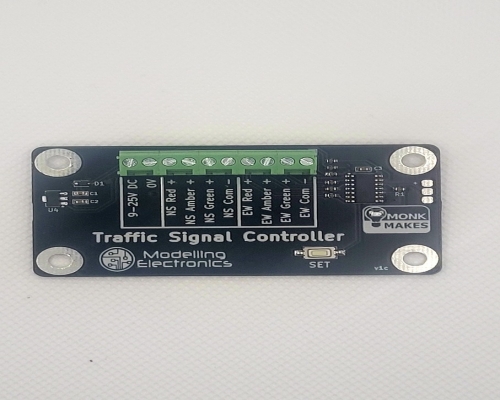
Our new UK traffic light circuit allows for greater realism on your model railway layout. The sequencing is in line with UK traffic lights. This is demonstrated in the video below.
The traffic light control circuit allows you to bring more realism to your model railway layout or model town. The circuit allows you to control 2 or 4 way traffic, (Allowing for two traffic lights North and South or four traffic lights, North South East and West).
Item number
Data Sheet
Product Name
Price
Add to Basket

Traffic Light Controller – Instructions
The Traffic Signal Controller is designed to control small LED traffic lights used with model railways.
Both GB standard lights (red+amber) and French (red straight to green) are simulated, each with 'normal' and 'slow' versions. Wiring
The board will accept power between 9V and 25V DC only.
The maximum current per LED is capped at 11mA making the outputs suitable for connecting directly to common negative type LED traffic lights. To adjust the brightness, extra resistors can be added. One set of connections is marked NS (North South) and the other EW (East West).
Two light model
A two light model should be wired as shown below.
In the diagram, the wires are colour-coded for the LED colour (red, orange and green). The black lead is the common negative (also called common cathode).
Four light model
When wiring up four traffic-lights, both sets of North South lights should be wired in parallel.

Setup
The board has four pre-programmed sequences and a setting to turn all the LEDs on -- useful when checking the wiring. The GB sequences, which are common to most of the world, are as follows:

The French have a different sequence; the lights go straight from red to green without an intermediate red/amber phase. The FR sequences follow this pattern:

The GB and French sequences are each available in two durations. The standard (20 seconds green time) and slow (40 seconds green time). The sequences are:
- 1 GB Standard (20 second green time)
- 2 GB Slow (40 second green time)
- 3 French Standard (20 second green time)
- 4 French Slow (40 second green time)
- 5 All on – all lights on at the same time (to aid wiring setup)
Sequence 1 is selected by default. If you wish to change this sequence to another sequence:
1. Press and hold down the switch until the orange LED in the logo on the board (the status LED) turns off (about 5 seconds). When this happens the traffic light sequencing will stop and the status LED will blink a number of times to show the current sequence. 1 blink means sequence 1, 2 blinks sequence 2 etc,
2. To change the sequence give the button a short press and the sequence number will be incremented. The status LED and any connected traffic lights will then flash the number of times for the sequence. Each time you press the button (short press) the next sequence number will be selected. After sequence 5, the sequence number will go back to 1.
3. To save the new setting press and hold the button until the status light comes back on (about 5 seconds) The setting will be remembered even if the board is powered down.